



Automatically collect and analyze concrete temperature and maturity data in real-time from anywhere.
Instant free PDF download for more info:
The COMMAND Center™ AutoCollect Advantage
- Automatically transmit data wirelessly to the COMMAND Center™ Cloud.
- Access data remotely and in real-time from anywhere, on or off the jobsite.
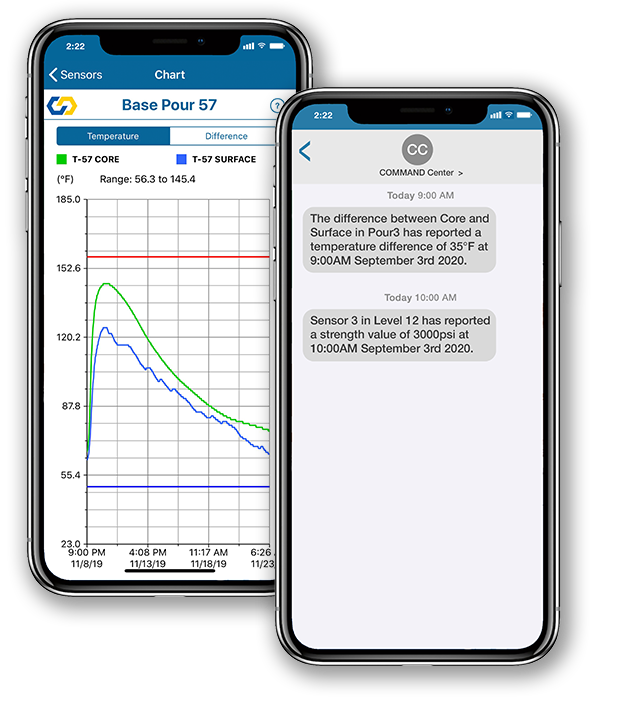
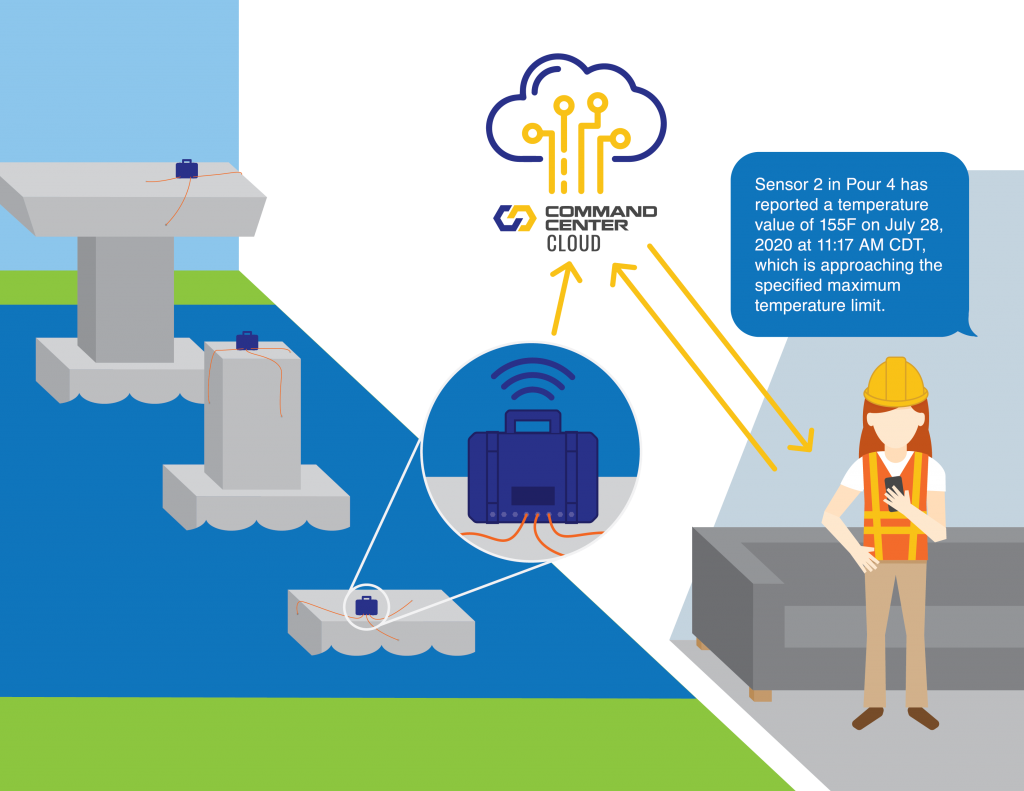
- Receive real-time alerts via text message or email when your concrete approaches temperature limits or achieves target strength.
- Sync project files automatically with team members and across multiple devices.
- Protect files with user privileges.
- Collect data from multiple sensors with a minimum of one reusable AutoCollector.
- Alternative download options and data redundancies reduce potential data loss.
- Unlimited users and no license fee for COMMAND Center™ Cloud access.
What equipment do I need and how much does it cost?
- COMMAND Center™ Sensors, starting at $49
- Free COMMAND Center™ Cloud access and software
- Minimum one $1,999 AutoCollector to transmit data to the cloud, cellular plan included
- An iPhone or iPad
- Optional: $179 AutoCollect-Enabled SRM
How does it work?
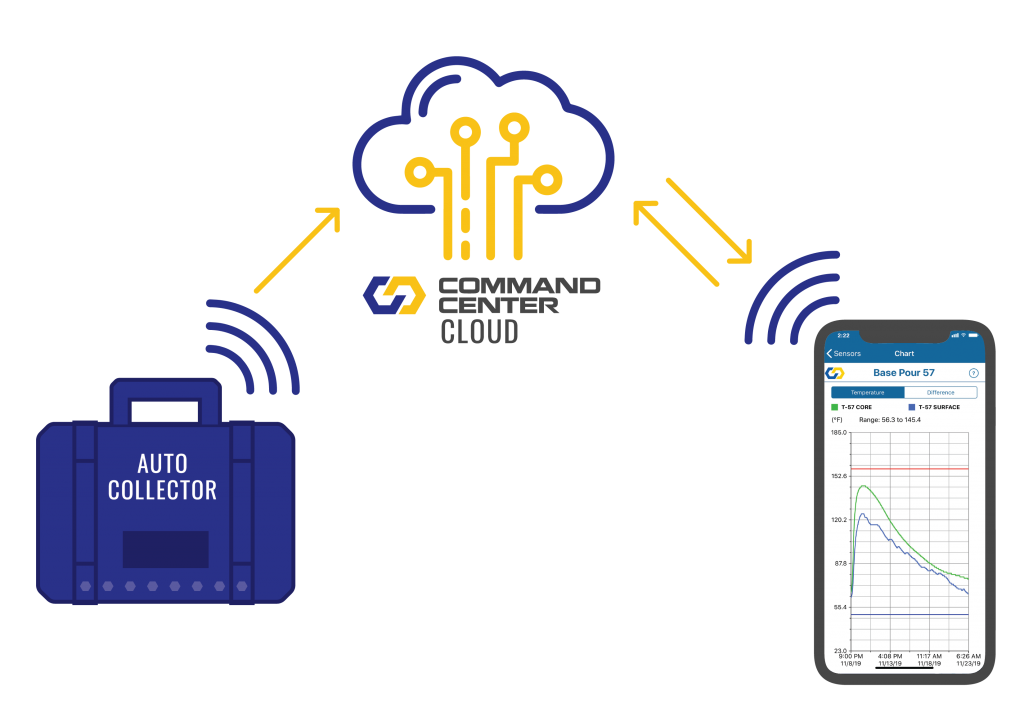
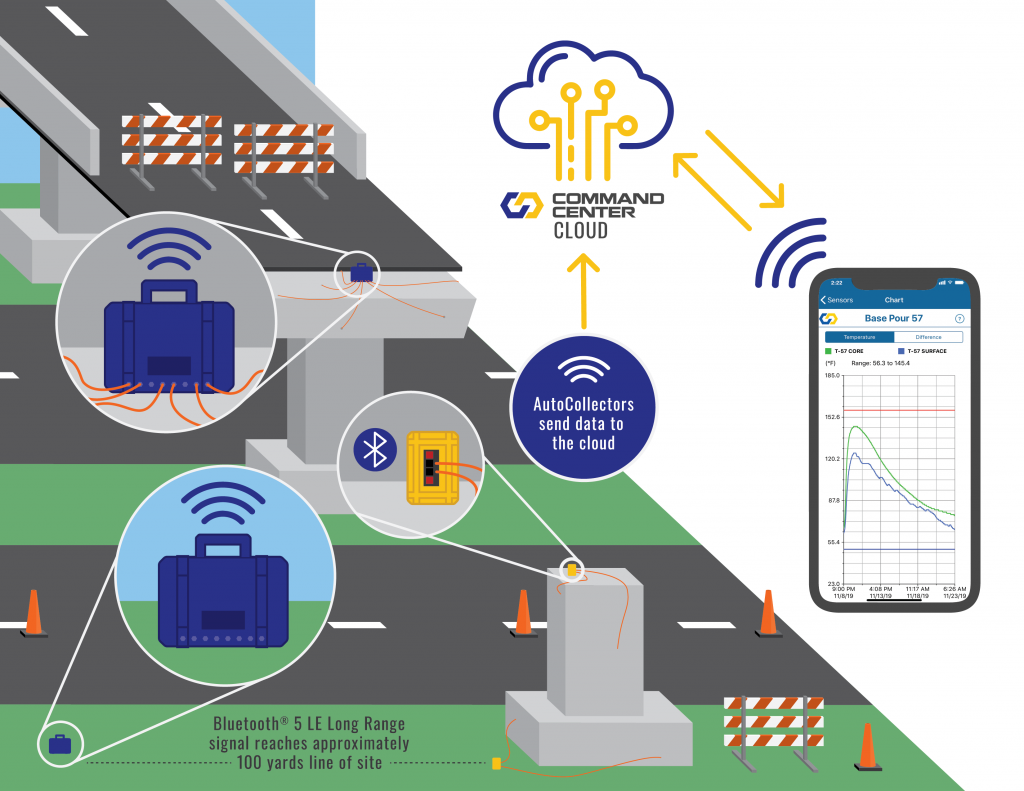
COMMAND Center™ AutoCollect uses a cellular signal to automatically send your concrete data to the COMMAND Center™ Cloud, where teams can access it in real-time from anywhere using their iOS device. COMMAND Center™ AutoCollector reads sensor data through a direct connection to sensors or by Bluetooth connection to AutoCollect-Enabled SRMs.
Automatically collect concrete data in multiple ways:

1
Connect COMMAND Center™ Sensors into new AutoCollect-Enabled Sensor Reader Modules (SRM). AutoCollect-Enabled SRMs transmit concrete data via Bluetooth to the AutoCollector. The AutoCollector then transmits concrete data to the COMMAND Center™ Cloud.
2
Connect one or more COMMAND Center™ Sensors directly into the AutoCollector. The AutoCollector will automatically read the sensor and send the data to the COMMAND Center™ Cloud.
3
Use a combination of AutoCollect-Enabled SRMs and/or AutoCollectors to meet your project needs and budget. Only the AutoCollector can automatically transmit data directly to the cloud.
Contact us today to determine the most cost-effective solution for your project.
COMMAND Center™ Cloud
The secure COMMAND Center™ Cloud works with or without the AutoCollect option, so existing COMMAND Center™ customers can start using it right away.
- Sync project files automatically with team members and across multiple devices.
- Protect files with user privileges.
- Unlimited users and no license fee for COMMAND Center™ Cloud access.
Get Started Now: Download the COMMAND Center™ for iOS app to access the COMMAND Center™ Cloud.
Why do our clients prefer COMMAND Center™?

“Choosing to work with COMMAND Center™ was a great decision for us. I’m the first to hear when things go wrong in the field, but since we implemented their database, the feedback has been all positive — from those who update maturity meters to anyone that uses the app. Things running smoothly like this are a big help!”

“COMMAND Center™ is way better than the maturity system we used to use. Being able to plug in the time after the sensor was placed and being able to download data right from the free app was a huge benefit. Plus the reports look a lot nicer than the ones we used to have.”

“As a construction team, we were proud of this schedule, and our subcontractors responded very positively to the consistency the maturity sensors helped create.”

“COMMAND Center™ is the most reliable and flexible system we have evaluated. Getting data to make decisions in a timely manner is critical to project schedules, and with COMMAND Center™ AutoCollect I don’t have to wait for others to download the data and send it to me.”
“We have used other systems in the past, but they are not as reliable as COMMAND Center™. Plus our team really likes the super simple set up of the system.”

“COMMAND Center™ was easy to use and allowed us to have better control of the curing temperatures”
“COMMAND Center™’s data transmission was very reliable. The AutoCollector was able to receive data from the SRM through multiple concrete decks, and I was very impressed with how well it worked.”

“There are numerous other systems out there, but none will give you the reliability and customer support that COMMAND Center™ does.”

“I liked having the data sent right to my phone and having the data stored all in one place. The COMMAND Center™ SRM and app made monitoring really easy and really convenient.”

“COMMAND Center™ shaves at least 30 minutes off every beam break, so we’re saving about 4.5 hours each day. Sitting out there in traffic is dangerous, so saving that time also means less exposure to hazards and fewer risks on the freeway.”

“COMMAND Center™’s maturity meters remove doubt as far as what the concrete is doing because field cured cylinders are touchy and completely dependent on humans doing everything right.”

“COMMAND Center™ is extremely user-friendly and flexible and we have yet to fully utilize all of its features. It’s easy to train field techs to use and its size is most convenient and extremely portable.”

“I’ve been using COMMAND Center™ for cold-weather temperature monitoring during curing. It’s reliable, easy to use, and our clients really like the reports that the software can generate.”

“We saved one day per floor. With 16 floors, we saved 16 days of schedule.”

“COMMAND Center™ is affordable, easy to use, and saved us significant time and money on the Palisades West office building, the W Hotel Austin, and Circuit of the Americas Formula 1 race track and event center.”
“The high level of customer service we have received is unlike anything I have ever experienced before.”

